v0.1 candidate manual

MiniSjammie

Compact filter effect for fast filtering, drive and synced or audio-reactive Motion. This manual follows the current 17-parameter Windows x64 VST3 and Standalone candidate.

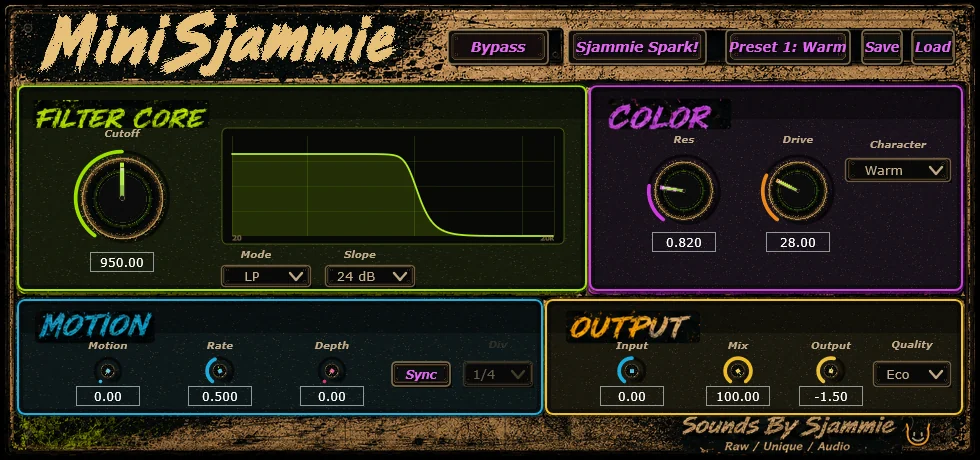
MiniSjammie plugin interface

First movement

Quick start

  1. Load MiniSjammie as an audio effect.
  2. Choose LP, HP, BP or Notch and set Cutoff.
  3. Add Resonance and Drive carefully.
  4. Choose Clean, Warm or Bite.
  5. Raise Motion and Depth, then choose LFO, Envelope or Hybrid.
  6. Enable Sync and pick a Division when movement should follow the DAW.
  7. Level-match with Output and Mix.

Install

Close DAWs before replacing the VST3. Use the package instructions for user-local or global installation, reopen the host and rescan. The Standalone candidate is a separate executable.

HOST SYNC

With Sync on, Division follows host BPM. Available divisions are 1/16, 1/8, 1/4, 1/2, 1 Bar and 2 Bar.

State and presets

All 17 parameters participate in saved state. The current project contains 20 factory presets; exact public preset notes will freeze with the release package.

Filter and level

Core controls

Input-18 to +18 dB input trim.
Cutoff20 Hz to 20 kHz filter frequency.
Resonance0.30 to 10.0 emphasis around cutoff.
ModeLowpass, Highpass, Bandpass or Notch.
Slope12 dB or 24 dB response.
Drive0 to 100% drive into the character path.
CharacterClean, Warm or Bite.
Mix0 to 100% dry-wet balance.
Output-18 to +12 dB output trim.
BypassHost-visible effect bypass.

Motion

Movement controls

MotionOverall movement amount from 0 to 100%.
RateFree-running rate from 0.05 to 20 Hz when Sync is off.
Sync / DivisionHost-tempo movement using six musical divisions.
DepthModulation depth from 0 to 100%.
Motion SourceLFO, incoming-audio Envelope or Hybrid movement.
QualityEco, 2x or 4x processing. Start with Eco and raise it when the session needs it.

Current evidence

Compatibility status

FormatsWindows x64 VST3 and Standalone candidate.
Automated matrix44.1, 48 and 96 kHz; block sizes 1 through 2048; pluginval strictness 10.
BitwigLocal pilot pass covers load, visible controls, automation, state recall, render/export and idle-noise proof.
Other hostsFL Studio remains the next manual host check. Standalone is built but still needs a manual audio-device sanity test.

Troubleshooting

Movement not moving?

Raise Motion and Depth, confirm a Motion Source, and check Sync/Division or free Rate. For envelope movement, feed the plugin an audible input signal.

Support guide